Rows Garden1.10.0-755
Publisher Description


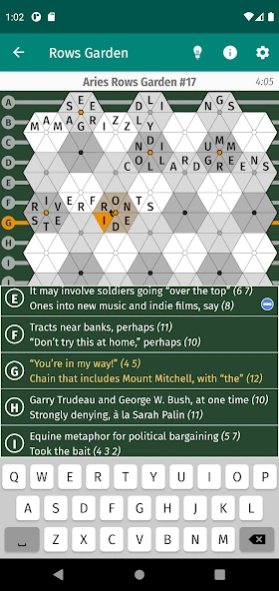

A challenging hexagonal twist on the traditional crossword puzzle.
Rows Garden is a crossword puzzle variant invented by Patrick Berry. Instead of the across and down clues and black and white squares of a traditional crossword grid, a Rows Garden puzzle consists of interlocking row and bloom clues whose answers are filled into a fully-packed grid of triangular spaces.
Each row consists of one or more clues, with answers entered across the rows of the garden from left to right. Bloom clues are grouped by shade -- light, medium, and dark -- and have six-letter answers that are each entered in a hexagonal bloom within the garden, with the starting point and direction left for you to determine.
You can adjust the difficulty level of the solving experience within the app, providing a suitable challenge for both beginning and experienced solvers.
The app comes with 30 full-sized puzzles and 135 smaller "Rosebuds" created by leading Rows Garden constructors to whet your appetite, and includes links to their Web sites for downloading and subscribing to puzzles that you can import into the app.
If you like crossword puzzles and are looking for a new challenge, or are seeking an interesting twist on the familiar crossword format, give Rows Garden a try!
About Rows Garden
The company that develops Rows Garden is Robert P. Bosch, Jr.. The latest version released by its developer is 1.10.0-755.
To install Rows Garden on your Android device, just click the green Continue To App button above to start the installation process. The app is listed on our website since 2026-10-03 and was downloaded 6 times. We have already checked if the download link is safe, however for your own protection we recommend that you scan the downloaded app with your antivirus. Your antivirus may detect the Rows Garden as malware as malware if the download link to edu.stanford.cs.bosch.rowsgarden is broken.
How to install Rows Garden on your Android device:
- Click on the Continue To App button on our website. This will redirect you to Google Play.
- Once the Rows Garden is shown in the Google Play listing of your Android device, you can start its download and installation. Tap on the Install button located below the search bar and to the right of the app icon.
- A pop-up window with the permissions required by Rows Garden will be shown. Click on Accept to continue the process.
- Rows Garden will be downloaded onto your device, displaying a progress. Once the download completes, the installation will start and you'll get a notification after the installation is finished.
Program Details
System requirements
Download information
Pricing
Version History
version 1.10.0-755
posted on 2026-10-03
• New Garden Party Rosebuds puzzle bundle -- 135 puzzles from Michael Blake, perfectly sized for solving on phones.
• Under-the-hood fixes and enhancements.
version 1.9.3-730
posted on 2025-08-18
Roll back previous change, since it caused issues on newer versions of Android.
version 1.9.1-726
posted on 2024-03-12
Fix highlights/circles for locked puzzles.
version 1.9.0-725
posted on 2024-03-02
• Add support for specifying highlighted and circled cells in the RG file.
• Add document button for showing puzzle notes (for puzzles that include them).
• Fix crash that could occur when the app goes into the background while solving a puzzle in a folder.
• Fix background of the Acknowledgments screen.
version 1.8.2-685
posted on 2021-09-16
. Add the Aries starter pack folders to the inventory if they weren't previously loaded.
. Fixed a crash that could occur when double-tapping a puzzle or folder in the puzzle list.
version 1.8.1-683
posted on 2021-08-17
Fixed a crash that could occur when importing puzzles.
version 1.8.0-680
posted on 2021-08-10
New feature: Puzzle folders.
Folders show up at the top of the puzzle list, and tapping them opens them up to show the list of puzzles in the folder.
Puzzle constructors can optionally specify that their RGZ puzzle bundles should be imported as folders instead of adding all of the puzzles to the main puzzle list, and you can create and manage your own puzzle folders using the new "File", "Extract", "Unpack", and "Rename" swipe-menu options.
version 1.7.0-555
posted on 2021-07-09
For phones and small tablets, added a button to show/hide the full list of row clues as an overlay on top of the bloom clue lists.
version 1.6.0-546
posted on 2021-02-09
. Added dark-mode colors for all three color schemes. The default is to use the system theme, but you can use the Theme setting to explicitly select light mode or dark mode.
. Made some small changes to the light-mode color schemes.
. Changed typeface to Fira Sans.
. Fixed a bug when swiping right to delete/reset puzzles on tablets.
version 1.5.0-497
posted on 2021-01-16
RGZ puzzle file fixes and enhancements:
. Added support for variety puzzles in which bloom answers need to be transformed before entry into the garden.
. Added support for row/bloom answer notes, displayed alongside the answers when the solver chooses to show answers of a correctly solved puzzle.
. Fixed a bug in the parsing of multi-line puzzle notes.
